Webflow vs WordPress: Which Is Right for Your SaaS in 2026?

Adrian KuleszoCo-founder
Table of contents
WordPress still powers a large portion of the web. Webflow has grown from a niche tool into a serious platform used by some of the best-designed SaaS companies in the world. If you’re choosing between them for a marketing site, or inheriting a WordPress site and wondering whether to stay, the comparison is worth doing properly.
We’ve built on both at DesignMe, migrated clients from WordPress to Webflow, and seen what each platform does well and where it falls apart for funded SaaS companies. Here’s the honest breakdown.
The Core Difference
WordPress is a content management system with a design layer bolted on. Webflow is a visual development environment with a CMS built in.
That distinction shapes almost everything else. WordPress was designed to publish content. Webflow was designed to build websites that also publish content. For a SaaS marketing site, where design quality, conversion performance, and brand consistency matter as much as content publishing, that starting point matters.
What WordPress Gets Right
The content ecosystem is unmatched. WordPress has had twenty years to build its plugin and theme ecosystem. Whatever you need to do, complex editorial workflows, multilingual content, membership gating, custom post types, advanced analytics, there’s almost certainly a plugin for it. Some of them are excellent.
SEO plugins. Yoast and Rank Math are genuinely good tools. They’ve shaped how a generation of marketers thinks about on-page SEO, and they work. Webflow has improved its SEO capabilities significantly, but the plugin layer WordPress offers for advanced SEO use cases is still more mature.
Developer availability. There are millions of WordPress developers in the world. If you need to hire someone to maintain or extend your site, finding talent is straightforward and the market is competitive on price.
Headless flexibility. For companies with more complex technical requirements: React frontends, composable architecture, custom data sources: WordPress as a headless CMS connected to a custom frontend is a legitimate approach that serious engineering teams use well. We cover when that’s actually the right call in our WordPress to headless CMS migration guide.
Cost of entry. The WordPress software itself is free. Hosting can be as cheap as $20 to $50 per month on shared infrastructure. For bootstrapped companies watching every dollar, this matters.
Where WordPress Falls Short
Security. This is the most consistent pain point we hear from companies migrating away from WordPress. The platform’s market share makes it the primary target for automated attacks, and its plugin ecosystem, where the real security risk lives, is inconsistently maintained. Managing updates, monitoring for vulnerabilities, and dealing with compromised sites is a non-trivial ongoing responsibility. For companies that don’t have a developer actively maintaining the site, it becomes a real liability over time.
Performance. A WordPress site can be fast. It requires deliberate effort, caching plugins, image optimisation, CDN configuration, and careful plugin selection. Out of the box, WordPress sites are often slow. Webflow’s hosting infrastructure handles most performance optimisation automatically.
Design fidelity. Translating a design into WordPress accurately is harder than it looks. Themes introduce constraints. Page builders like Elementor and Divi add flexibility but also add overhead, often producing bloated code that hurts performance. Getting a WordPress site to look exactly like a Figma comp requires more effort than the equivalent in Webflow.
The update burden. WordPress core updates, theme updates, and plugin updates need to be managed. Some updates break things. Managing this without causing site downtime requires either a developer on hand or a managed hosting service that handles it for you, which adds to the real cost.
Editor experience. Gutenberg, WordPress’s block editor, is functional but not elegant. For marketing teams that need to publish content quickly and maintain design consistency while doing it, Webflow’s Editor is considerably more controlled. In WordPress, it’s relatively easy for non-technical users to accidentally break the visual design of a page.
These pain points are exactly why teams leave, and we’ve written about the broader pattern in why modern teams are moving away from WordPress.
What Webflow Gets Right
The case for Webflow in the SaaS context comes down to four things: design fidelity, security, performance, and the editor experience for marketing teams.
Design fidelity. What you build in Webflow looks like what you designed. There’s no translation layer, no theme constraints, no page builder compromises. For companies where brand consistency matters, and at Series A and beyond, it should, this is a meaningful advantage.
Security. Webflow hosts your site on its own infrastructure. There’s no plugin ecosystem to maintain, no WordPress core to patch, no server configuration to get wrong. The attack surface is dramatically smaller. We’ve never dealt with a compromised Webflow site. We’ve dealt with plenty of compromised WordPress sites.
Performance. Webflow’s hosting is fast by default. Clean code output, automatic image optimisation, global CDN, and no plugin bloat produce load times that would require significant engineering effort to achieve on WordPress.
The Editor. Marketing managers can update copy, manage CMS content, and add blog posts in Webflow without ever touching the Designer. The design constraints are preserved. It’s genuinely difficult to break the visual design through the Editor, which matters when multiple people are updating the site.
Where Webflow Falls Short
Plugin ecosystem. Webflow doesn’t have twenty years of plugins behind it. Advanced editorial workflows, complex membership logic, sophisticated A/B testing, and custom content types that sit outside Webflow’s CMS model often require third-party tools or workarounds that would be simpler on WordPress.
Developer ecosystem. There are far fewer Webflow developers in the world than WordPress developers. Finding good Webflow talent, especially people who can build complex, well-architected sites rather than just customise templates, is harder and more expensive.
Complex data requirements. If your site needs to display dynamic data from external sources, integrate deeply with a product database, or handle genuinely complex content relationships, Webflow’s CMS has limits that WordPress with a custom backend doesn’t.
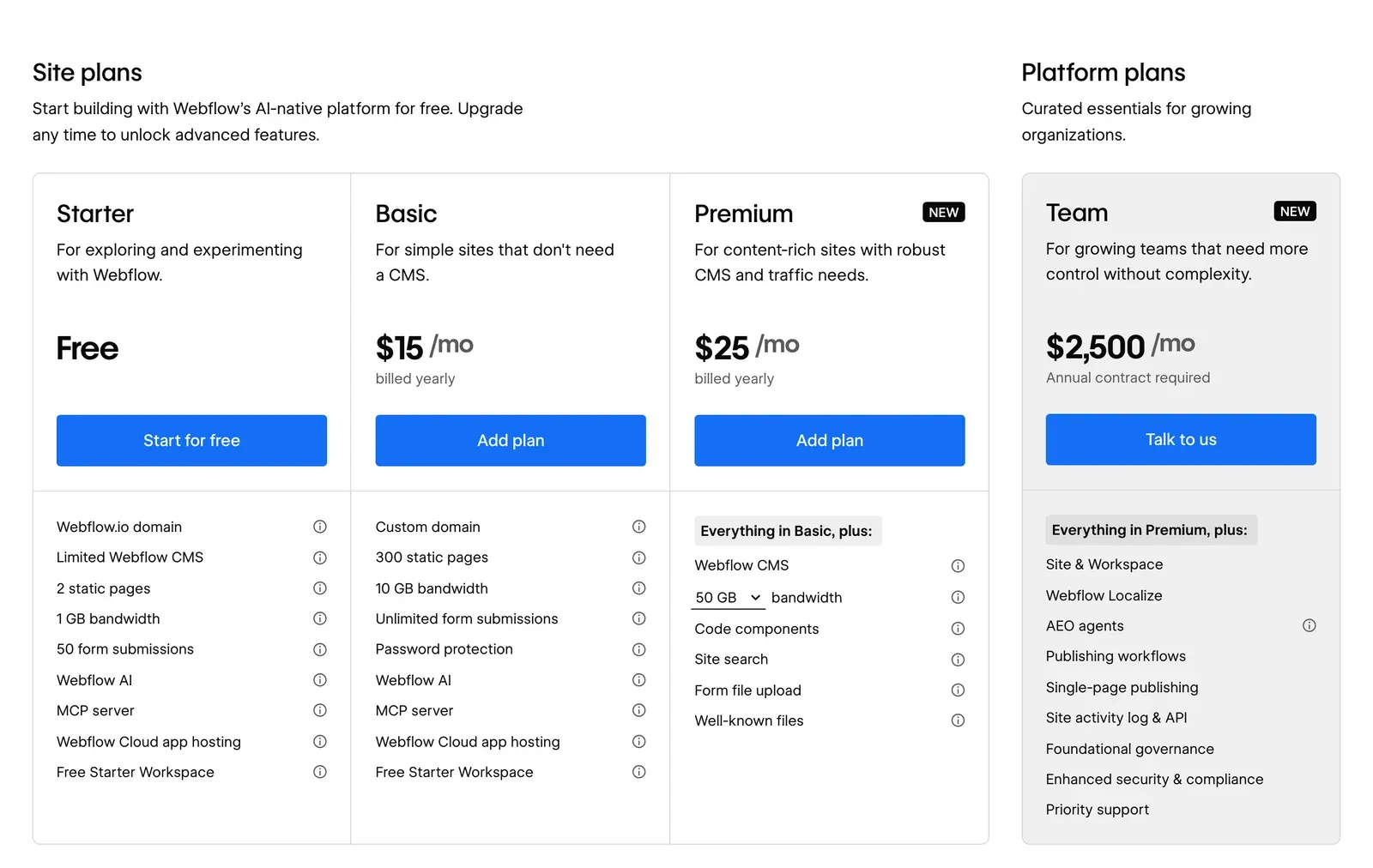
Cost at scale. WordPress on managed hosting (Kinsta, WP Engine) plus necessary plugins can cost $100 to $300 per month. Webflow on a Premium plan plus workspace seats is comparable, but the cost structure feels less flexible for companies with unusual requirements. We break the real numbers down in our Webflow pricing and cost-of-ownership guide.
The Migration Question
The most common migration we run isn’t Framer to Webflow, it’s WordPress to Webflow. The reasons are almost always the same: security incidents that spooked the team, design quality that the site couldn’t achieve on WordPress, or a marketing team that kept accidentally breaking pages in Gutenberg.
A proper WordPress to Webflow migration takes six to eight weeks for a typical SaaS site, depending on size. The work involves auditing all existing pages and content, mapping CMS architecture into Webflow’s structure, rebuilding the design in Webflow (often improving it in the process), exporting and importing content, and, critically, mapping every URL to a 301 redirect so that SEO equity built on WordPress transfers cleanly.
- Audit All existing pages and content.
- Map the CMS WordPress structure into Webflow’s.
- Rebuild The design in Webflow, often improving it.
- Move content Export from WordPress, import into Webflow.
- Redirect Every URL mapped to a 301 so SEO equity transfers.
The redirect mapping is where careless migrations lose rankings that took years to build, we go deep on exactly how to migrate from WordPress without losing SEO separately. If anyone is promising a fast migration without a detailed redirect strategy, they’re not doing it properly.
Which Platform by Stage
Pre-seed / bootstrapped: WordPress with a clean theme is a reasonable starting point if you have a developer comfortable with it. The cost is low and the content flexibility is high.
Seed: Both work, but Webflow is increasingly the default for design-forward SaaS companies at this stage. The security and performance advantages start to matter as the site becomes a real sales asset.
Series A and beyond: Webflow. The design fidelity, editor experience, and security posture are consistently better for companies where the website is a commercial function. If you’re still on WordPress at this stage and experiencing pain points, the migration ROI is almost always positive.
The Verdict
WordPress is a more powerful and flexible platform in the abstract. Webflow is a better platform for what most funded SaaS marketing sites actually need to do.
The companies we work with at DesignMe are almost universally better served by Webflow. The exceptions are companies with genuinely complex content requirements, development teams that prefer the WordPress ecosystem, or situations where a headless CMS approach makes technical sense.
For everyone else, a funded B2B SaaS company that needs a fast, secure, well-designed marketing site that a marketing team can operate without constant developer involvement: Webflow is the stronger choice in 2026. And if you’re weighing Webflow against the other obvious modern option rather than WordPress, see Webflow vs Framer.
DesignMe builds and migrates marketing sites for funded B2B SaaS and AI companies on Webflow and Framer. If you’re deciding between platforms or thinking about a migration, we’re happy to give a straight answer based on your setup:
Want us to do it?WordPress to Webflow migration