Framer vs WordPress: Which Is Better for Startup Websites?

Adrian KuleszoCo-founder
Table of contents
I’ll declare my bias up front: we ran designme.agency on Framer for three years before moving it to Astro in October 2026. We chose Framer not because it’s universally better than WordPress, it isn’t, but because for a design studio whose marketing site needs to be fast, beautiful, and updatable without a developer, Framer is the obvious tool. The same logic applies to a lot of startups, which is why this comparison comes up constantly.
But I’ve also seen founders pick Framer for the wrong reasons and regret it, and I’ve seen others cling to WordPress long after it stopped serving them. So this is the honest version, where Framer wins for a startup, where WordPress still makes sense, and how to tell which camp you’re in.
The Core Difference
WordPress is a content management system that’s been around for twenty years, built to publish content and extended through a vast plugin ecosystem to do almost anything. Framer is a design-first website builder that grew out of a prototyping tool, built to produce fast, polished, interactive sites without code.
That lineage explains most of the differences. WordPress thinks in posts, pages, and plugins. Framer thinks in canvases, components, and interactions. For a startup whose website is primarily a marketing and brand asset, that difference tends to favour Framer. For a startup running a serious content operation with complex requirements, it can favour WordPress.
Where Framer Wins for Startups
Speed of shipping. This is the big one. A startup changes its positioning, its messaging, and its pages constantly. On WordPress, meaningful changes usually require a developer, every iteration is a ticket in a queue. On Framer, a designer or marketer makes the change and publishes it the same day. For a company that needs to move fast, that difference compounds into a real competitive advantage.
Design quality out of the box. WordPress page builders impose a design language, and most WordPress sites end up looking like WordPress sites. Framer has no such ceiling, what you design is what ships, including motion and interaction that would take a WordPress developer real effort to replicate. For a startup where the site is part of the credibility story, raising a round, coming out of stealth, selling to sophisticated buyers, that polish matters more than founders sometimes admit.
No developer bottleneck. Lean teams can’t afford to route every site change through engineering. Framer takes the marketing site off the engineering roadmap entirely, which frees your developers to work on the actual product.
Performance by default. Framer sites are fast without anyone managing performance. WordPress can be fast, but usually only after active optimisation work that most early-stage teams don’t have the bandwidth for. Speed affects both rankings and conversion, so this isn’t cosmetic.
Lower maintenance. No plugin updates, no plugin conflicts, no security patching. The platform handles it. For a team without a dedicated webmaster, that’s hours back every month.
Where WordPress Still Makes Sense
I’d be doing you a disservice if I pretended Framer wins every time. WordPress is the better choice when:
You run a heavy content operation. Large editorial teams, complex publishing workflows, hundreds or thousands of articles with intricate taxonomies: WordPress’s CMS maturity handles this better than Framer’s, which is built for the content volume of a typical marketing site.
You need a specific plugin ecosystem. If your operation depends on mature plugins for advanced SEO workflows, membership systems, complex integrations, or functionality that simply doesn’t exist on Framer, the migration cost may outweigh the benefit.
You’re building something closer to an application. Framer is for sites, not apps. Heavy backend logic, user authentication, complex databases, deep e-commerce, these are not Framer’s job. If that’s your need, neither Framer nor a straight WordPress site is really the answer; you’re looking at a proper application stack.
You have deep in-house WordPress expertise. If your team lives in WordPress and is genuinely productive there, the friction Framer removes for others may not be friction you’re feeling.
The Practical Comparison
Cost. Framer’s pricing is lean for a marketing site. The free plan publishes only to a Framer subdomain; the Basic plan runs $10/month billed annually for small sites; and the plan most businesses actually want is Pro at $30/month billed annually, with editor seats billed separately at $20 per editor per month. WordPress itself is free, but the real WordPress cost is hosting, premium themes, premium plugins, and developer time, which, over a couple of years, frequently exceeds a comparable Framer setup. The “WordPress is free” line is true only until you add everything that makes it work.
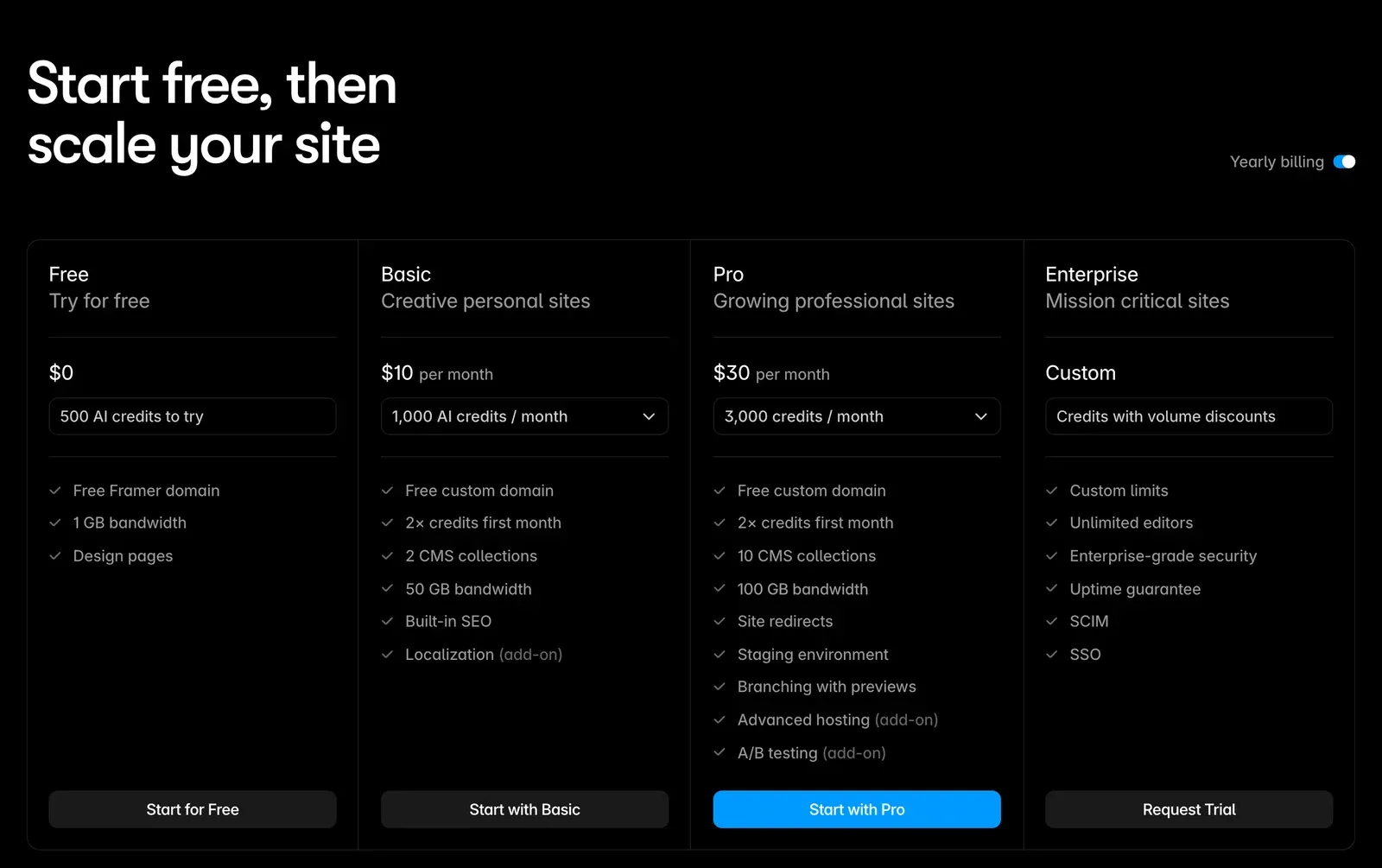
Ease of use. Framer has a gentle learning curve for anyone with design sensibility, and a marketer can be productive quickly. WordPress’s editing experience was built for blogging and shows its age for building structured, branded pages.
SEO. Both can rank perfectly well. WordPress has the more mature SEO plugin ecosystem (Yoast, Rank Math), which matters for advanced use cases. Framer covers the fundamentals, per-page meta, sitemaps, 301 redirects, schema via custom code, more than adequately for a marketing site. Neither platform has an inherent SEO disadvantage; the difference is depth of tooling, not capability.
Scalability. WordPress scales further in content complexity. Framer scales beautifully in design and speed but hits limits with very large or very complex content operations.
| Factor | Framer | WordPress |
|---|---|---|
| Cost | Pro $30/month billed annually, plus $20 per editor per month | Free to install; hosting, premium themes, plugins and developer time on top |
| Ease of use | Gentle learning curve; a marketer is productive quickly | Editor built for blogging, shows its age for branded pages |
| SEO | Per-page meta, sitemaps, 301 redirects, schema via custom code | Deeper plugin ecosystem (Yoast, Rank Math) |
| Scalability | Scales in design and speed; limits with very large content operations | Scales further in content complexity |
So Which Should a Startup Choose?
For most early-stage and growth-stage startups, the website is a marketing and brand asset, the team is lean, and speed of shipping matters enormously. In that situation, which is the common one, Framer is usually the better choice. It removes the developer bottleneck, ships a better-looking site, and costs less to run than a properly maintained WordPress install.
WordPress earns its place when you’re running a genuinely heavy content operation, you depend on its plugin ecosystem, or you have deep in-house expertise that makes the friction disappear. Those are real situations, just less common among the funded startups we work with.
The honest test is this: is your website mainly there to look exceptional and convert, or is it mainly there to run a complex content machine? The first is a Framer story. The second leans WordPress. Most startups are the first and don’t realise how much the WordPress bottleneck is costing them until they leave.
If you’re considering the move, our WordPress to Framer migration guide walks through how to do it without losing traffic, and if you’re weighing Framer against Webflow as your destination, the Webflow or Framer decision guide compares the two paths directly. For the Webflow side of this comparison, see Webflow vs WordPress for B2B SaaS.
DesignMe builds and migrates startup websites, we ran our own site on Framer for three years before moving it to Astro, and we’ve made the call about who it’s right for more times than I can count. If you want a straight answer on whether Framer fits your team and stage, our intro call is 30 minutes:
Want us to do it?WordPress to Framer migration